

Critical security vulnerabilities known as “PHP2Shell” (CVE-2026-109618 and CVE-2026-109619) have been disclosed, affecting core PHP runtime engines. Rated at a severe 9.2 CVSS score, these memory-safety flaws allow unauthenticated attackers to achieve Remote Code Execution (RCE).
Because these bugs reside within the PHP interpreter itself, updating your WordPress plugins or core files isn’t enough—you must update the underlying PHP runtime version. If you run your WordPress site inside Docker containers, you have a massive advantage: containerized deployments make patching quick, isolated, and safe, provided your persistent storage is configured correctly.
The PHP Version Patch Matrix
The PHP development team has released emergency security patches across active branches. Check which branch your containers are using and upgrade immediately to or above the fixed versions:
| PHP Branch | Vulnerable Range | First Fixed Version |
| 8.5 | below 8.5.12 | 8.5.12 |
| 8.4 | below 8.4.27 | 8.4.27 |
| 8.3 | below 8.3.36 | 8.3.36 |
| 8.2 | below 8.2.35 | 8.2.35 |
Why Containers Make This Safe (If Volumes Are Set Up Right)
When running WordPress via containers, your website files (wp-content) and database should never live inside the ephemeral container itself. Instead, they should reside on Docker volumes or host bind-mounts.
This architecture allows you to completely destroy, recreate, or upgrade the PHP application container without losing a single uploaded image, post, or database record.
Check The Current Version
Check the current PHP binary, run an execution check inside the container:
docker exec -it <your_wordpress_container_name> php -v
Step-by-Step Guide: Safely Updating Your Containerized WordPress Stack
Step 1: Create a Safety Backup
Before making major runtime changes or shifting PHP versions, always secure a fallback:
- Via WordPress Dashboard: If your site is currently running, use a plugin like UpdraftPlus to create an immediate backup of your database, plugins, themes, and uploads, downloading a safe copy to your local machine.
- Via Command Line / Database Export: Alternatively, export a fresh copy of your MySQL database using a tool like phpMyAdmin or WP-CLI (
wp db export).
Step 2: Update Your Container Configuration (Choose Your Strategy)
Open your generic deployment configuration file (e.g., docker-compose.yml). You can choose between The Latest Rolling Tag or Strict Version Pinning:
- Option A: Using the Latest Rolling Tag (Automatically receives ongoing minor updates and patches within that branch):
services: wordpress: image: wordpress:php8.5-apache # Or php8.4-apache, php8.3-apache, etc. # ... rest of your generic configuration
- Option B: Pinning to an Exact Patched Version (Guarantees absolute consistency and prevents unexpected auto-updates):
services: wordpress: image: wordpress:8.5.12-apache # Explicitly pinned to the exact patch release # ... rest of your generic configuration
Step 3: Pull and Recreate the Container
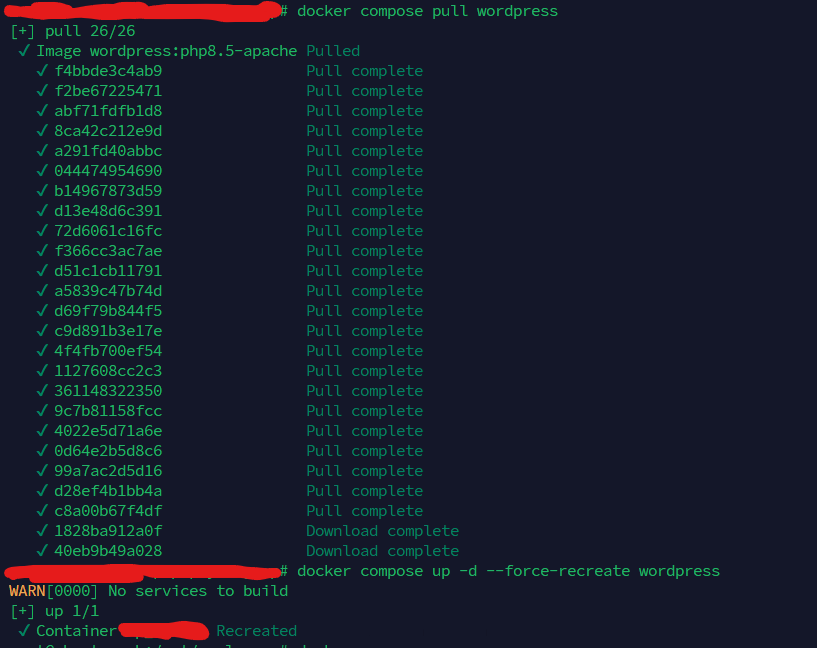
Force Docker to fetch the newly patched image layer and spin up a fresh container instance without affecting your persistent data volumes:
docker compose pull wordpress
docker compose up -d --force-recreate wordpress
Step 4: Verify the Runtime Fix
To confirm that your live container is executing the patched PHP binary, run an execution check inside the container:
docker exec -it <your_wordpress_container_name> php -v
Ensure the output displays a version matching or exceeding the patch floor (e.g., PHP 8.2.35, PHP 8.3.36, PHP 8.4.27, or PHP 8.5.12).

Ensuring Plugin and Theme Compatibility
When you bump your PHP runtime version (especially if you are jumping multiple minor or major versions), third-party plugins or legacy themes might throw warnings or fatal errors. Follow these best practices post-update:
- Check Error Logs: Monitor your container logs (
docker compose logs -f wordpress) right after restarting to catch any PHP deprecation notices or plugin conflicts early. - Update Plugins: Ensure all active plugins—including your backup tool like UpdraftPlus—are updated to their latest versions, as developers frequently push compatibility updates for newer PHP runtimes.
- Staging First: If possible, test major PHP upgrades in a local staging container before applying them to your production environment.
By combining rapid runtime patching with Docker’s volume isolation, you can neutralize critical threats like PHP2Shell while keeping your WordPress site secure and fully intact