
For engineers managing on-premise infrastructure, the game has officially changed. We are no longer just “Storage Admins” hooking up disks to servers; we are Private Cloud Architects.
The core requirement now is building a private cloud that mimics the speed and flexibility of AWS, but entirely within your own four walls. Achieving this requires moving beyond legacy storage definitions. If you are designing an on-prem environment today, you must prioritize four key architectural pillars.
Here is a summary of the concepts you need to master.
Pillar 1: Drive Redundancy: The Death of RAID-6
In a private data center, disk density is both your best friend and your worst enemy. With 30TB+ SSDs becoming the norm, a drive rebuild on a traditional RAID-6 array can take days. If a third drive fails during that window, you face catastrophic data loss.
The Modern Solutions:
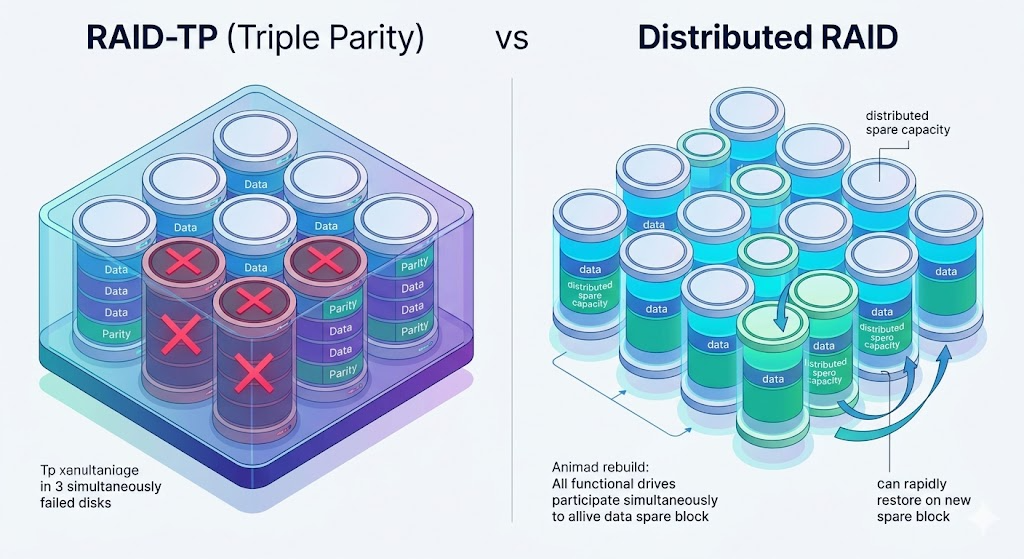
- RAID-TP (Triple Parity): This allows an array to survive three simultaneous disk failures. This massive boost in resiliency is a cornerstone of architectures like Huawei’s OceanStor.
- Distributed RAID (DRAID): The industry alternative favored by Dell and HPE. Instead of having a dedicated “hot spare” sitting idle, spare capacity is distributed across all drives in the pool. When a drive fails, every single drive works together to rebuild it, slashing rebuild times from days to hours.
Visualizing Redundancy: This comparison diagram illustrates the mechanics. On the left, RAID-TP actively labels and survives three disk failures (marked by red X’s). On the right, Distributed RAID shows how all functional drives immediately participate in a rapid rebuild, distributing the workload across the entire storage pool rather than a single spare.
Pillar 2: Performance: Why ROW is the New Standard
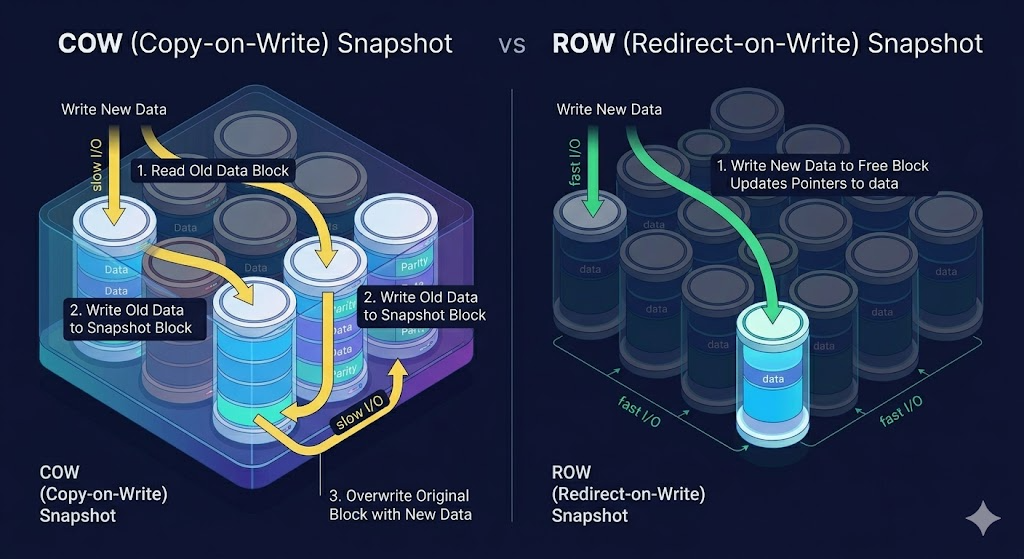
If your private cloud feels sluggish during backups or critical application I/O, your snapshot architecture might be the culprit. Legacy systems relied on COW (Copy-on-Write), which comes with a massive performance penalty.
The Modern Standard: ROW (Redirect-on-Write).
Most modern All-Flash arrays (including Huawei, Pure Storage, and Dell PowerStore) now use ROW. This architecture avoids the multi-step penalty entirely.
Snapshot Performance Logic: This infographic contrasts the logical flow of I/O. The left side (COW) illustrates the “Write Penalty” (a multi-step operation to move old data before writing new data). The right side (ROW) details the streamlined process: new data is written directly to a free block, with only a pointer update required. Green and yellow arrows clearly visualize the speed difference.
Pillar 3: Security: The “Cyber Vault” and WORM
In a private data center, you are the last line of defense against ransomware. Standard backups are no longer enough; modern attackers target backup infrastructure first.
- WORM (Write Once, Read Many): This protocol physically prevents data from being deleted, modified, or encrypted until a specific timer expires. Even an administrator cannot bypass the lock.
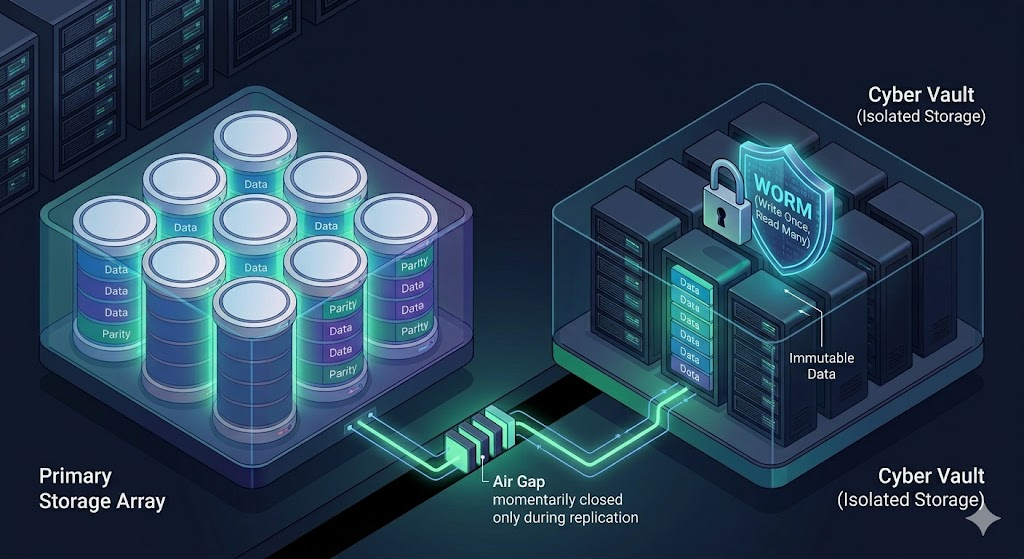
- Air-Gap Vaults: Modern security architectures now rely on a “Cyber Vault”—a physically isolated storage array. This array only opens its network ports for a few minutes a day to sync new data, then goes completely offline (creating a physical “air gap”). If your production network is compromised, the vault remains invisible and untouched.
Visualizing the Vault: This infographic illustrates the concept of secure isolation. The Primary Storage Array replicates data across a physical floor gap. The gap itself is managed by an automated air-gap mechanism (the segmented path in the diagram). The secondary vault is shown with data blocks that are both logically locked (the physical padlock) and digitally reinforced with WORM/Immutable Data shields, ensuring the data cannot be modified.
Pillar 4: Cloud-Native Agility: The K8s CSI Plugin
Your on-prem storage should not be a “black box” that requires IT tickets to provision. To build a true private cloud, your storage must speak Kubernetes.
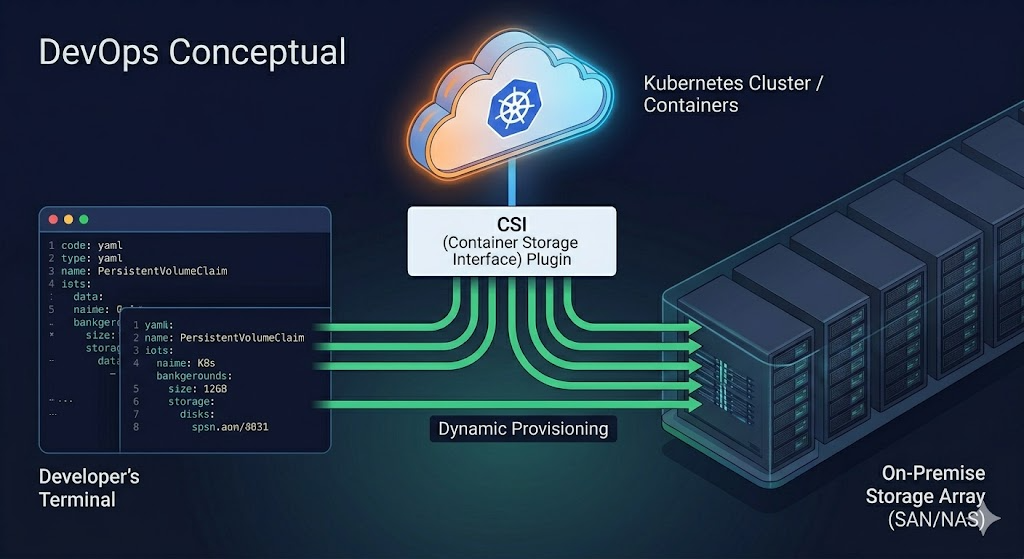
By utilizing a CSI (Container Storage Interface) plugin, your private data center infrastructure becomes infrastructure-as-code. Developers can request persistent storage volumes automatically via simple code (YAML manifests). Whether you use Huawei’s CSI, Dell’s Container Storage Modules (CSM), or HPE Alletra, the integration objective is seamless, automatic provisioning for containerized workloads.
K8s Storage Integration: This diagram visualizes the interaction. A cloud-native Kubernetes Cluster (the orange cloud icon) uses the CSI Plugin block as the intermediary mediator. A developer terminal interface (left) shows code snippets that trigger the flow. Arrows indicate how the CSI Plugin dynamically provisions the requested volumes on the backend on-premise storage racks (right).
Vendor Ecosystem: Who Fits Where?
While Huawei is currently leading in raw hardware R&D—specifically in high-density All-Flash architectures, RAID-TP, and AI-driven management (DME)—the right choice depends on your specific software and ecosystem requirements.
| Vendor Focus | Primary Strength | Best For… |
| Huawei (OceanStor) | Hardware excellence, RAID-TP, massive IOPS. | High-density data centers, heavy AI/ML workloads, and storage optimization. |
| Dell (PowerStore/Max) | Dynamic Resiliency Engine (Distributed RAID) and massive VMware/Microsoft ecosystem stability. | Mission-critical environments requiring high stability and direct integration. |
| HPE (Alletra) | Cloud-native dashboard experience for on-prem hardware. | Teams prioritizing a “Storage-as-a-Service” operational model for simple consumption. |
The Bottom Line: Don’t just buy a box. Buy an architecture that supports Triple Parity, ROW snapshots, WORM security, and Kubernetes integration. That is how you build a private data center that will thrive into the next decade.